Workbite: Corporate Meals Digitized — From Registration to Reports
With Workbite, companies can organize corporate meals for their employees — including registration, employee management, restaurant partnerships, and detailed reports. Restaurants gain full planning control, companies keep the overview.

Workbite: Corporate Meals Digitized — From Registration to Reports
Lunch breaks at companies have followed the same pattern for decades: the cafeteria cooks for everyone, a handful of delivery services rotate through, or employees go eat individually — each on their own, without coordination, without oversight. For companies, this means lost control over costs and quality. For restaurants, it means unpredictable order volumes and unreliable demand.
Workbite changes that fundamentally. It's a fully integrated system that digitally connects companies and restaurants — from company registration through employee management to detailed financial reports and daily prep lists.
How It Works: The Three Pillars
Workbite consists of three interlocking systems, each tailored to the needs of its user group:
| User | Platform | Function |
|---|---|---|
| Companies (Supervisors) | Gustaio Dashboard (Web) | Register company, manage employees, view reports |
| Employees | Gustaio App / Web | Order meals, plan pre-orders, browse menus |
| Restaurants | Gustaio Studio (Tablet App) | Manage Workbite settings, handle requests, process orders |
1. Company Registration: Four Steps to a Company Account
Getting started for companies is intentionally simple. Registration happens through the Gustaio Dashboard in four steps:
Step 1: Create an Account
The supervisor signs in with Google, Apple, or email. If a personal Gustaio account already exists, this step is automatically skipped.
Step 2: Enter Company Details
- Company name and contact details (email, phone)
- Company address with Google Places autocomplete — coordinates are automatically saved and used for nearby restaurant searches later
- Tax ID (optional, for invoicing)
Step 3: Add Initial Employees
At least one employee is added directly during registration — with first name, last name, and an internal employee ID (e.g., EMP-001). More employees can be imported later through the dashboard.
Step 4: Review and Submit
A summary of all data is displayed. After confirmation, the company account is created and the registrant is automatically assigned as a Supervisor — with full access to employee management and reports.
After registration, each company receives a unique company code that serves as the link between company, employees, and restaurants.
2. Connecting Restaurants: Requesting Partner Access
Once the company account is set up, the supervisor can search for nearby restaurants and request partner access. The search uses the company address entered during registration to sort restaurants by distance.
How the Connection Works
- Search for restaurants — by name or automatically by proximity to the company address
- Configure the request — the supervisor selects the desired order types:
- 🏢 Dine on-site — employees eat directly at the restaurant
- 🚗 Company pickup — a company driver picks up the orders
- 🛵 Delivery to company — the restaurant delivers to the office
- Set a validity period — unlimited or with start and end dates
- Submit the request — the restaurant is notified and can accept, adjust, or decline the terms
What the Restaurant Sees
In Gustaio Studio, the request appears in the Workbite company management section. The restaurant owner sees the company name, code, requested order types, and an optional message. They can:
- ✅ Approve — with optional adjustments to order types and validity period
- ❌ Deny — with a reason
- 🔄 Revoke later — access can be withdrawn at any time
The status is displayed in real time in the company dashboard — including status badges for Pending, Active, Expired, or Revoked.
3. Managing Employees: From Single Entries to CSV Imports
Employee management is the heart of the Workbite dashboard. Supervisors have full control over their team — all in one central view.
Adding Employees
There are three ways to add employees:
- Add individually — first name, last name, internal ID, optional email, phone, and language
- CSV/Excel import — upload files via drag & drop. The system auto-detects column headers (including German: Vorname, Nachname, Personalnummer) and offers manual mapping. Duplicates are automatically detected and skipped.
- Bulk invitations — send invitation links via WhatsApp or email to multiple employees at once
Connecting Employees to Gustaio Accounts
Employees are initially not linked to a personal Gustaio account. The connection works via an invitation link:
- The supervisor sends an invitation link via WhatsApp, email, or as a copyable link
- The employee signs in with Google, Apple, or email
- The employee enters their company code — the link is established automatically
- From that point on, the employee can order at all approved restaurants
Roles and Status
| Feature | Supervisor | Standard Employee |
|---|---|---|
| Manage employees | ✅ | ❌ |
| View reports | ✅ | ❌ |
| Request restaurant access | ✅ | ❌ |
| Place orders | ✅ | ✅ |
| Status changeable | Only by other supervisors | By any supervisor |
Each employee can be set to Active or Paused. Paused employees cannot place orders — the block takes effect immediately and reliably.
4. The Ordering System: How Employees Order
Once an employee is linked and at least one restaurant has been approved, they can order directly through the Gustaio app or web. The flow:
- Select a restaurant — only restaurants with active partner access are shown, sorted by availability
- Browse the menu — including special Workbite daily menus configured by the restaurant for corporate customers
- Choose a time slot — restaurants define service windows (e.g., 11:00–14:00) with configurable slot durations (15, 30, 45, or 60 minutes)
 4. Select order type — pickup, delivery, or dine-in, depending on the agreement
5. Place the order — the order is created as a Workbite pre-order (status: pending) and appears immediately in Gustaio Studio
4. Select order type — pickup, delivery, or dine-in, depending on the agreement
5. Place the order — the order is created as a Workbite pre-order (status: pending) and appears immediately in Gustaio Studio
Orders can be edited or canceled until the configured deadline. Restaurants can set global or slot-specific order deadlines.
5. Restaurant View: Full Planning Control in Gustaio Studio
For restaurants, Workbite is a planning game-changer. Instead of managing unpredictable order volumes, restaurant operators see in advance what has been ordered — broken down by time slot, order type, and menu item.
Workbite Settings
In Gustaio Studio, restaurants configure:
- Enable/disable Workbite — a toggle to pause all corporate orders
- Order types — separately configurable for dine-in, pickup, and delivery
- Time slots — service windows with start and end times, slot duration, and optional names (e.g., "Lunch Service", "Breakfast"). The system auto-generates individual pickup times.
- Order deadlines — configurable globally or per slot (e.g., "orders must be placed by 9:00 AM the day before")
Live Dashboard
The live dashboard shows in real time:
- All orders for the day, filtered by order type (delivery, pickup, dine-in, or custom options)
- Item overview — how many portions of each dish need to be prepared
- Slot × order type matrix — a cross-reference showing which slot has which order types and quantities
- Daily summary — total orders, total items, total revenue
Reports for Restaurants
Restaurants can generate detailed reports through Gustaio Studio:
- Daily reports — item quantities, broken down by date
- Manifest lists — printable compilations for the kitchen
- Company reports — order overviews filtered by company
- PDF export — for accounting and invoicing
6. Reports for Companies: Three Perspectives, One Dashboard
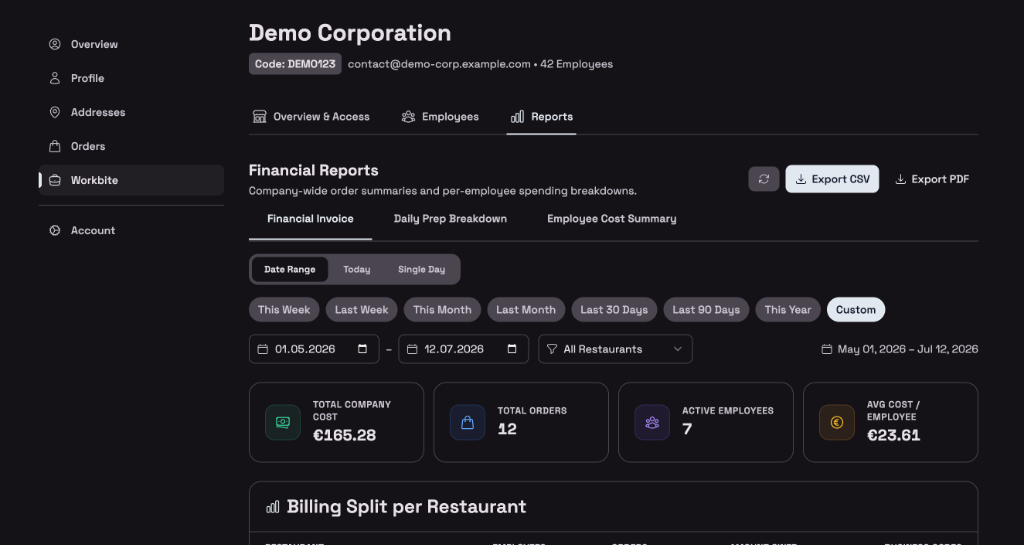
The reporting system in the Gustaio Dashboard gives supervisors a comprehensive overview of all corporate meals — with fast analysis even at high order volumes.
Financial Report / Invoice
The central report for accounting:
- Total company expenses over the selected period
- Per-employee breakdown — who ordered how much, average order value, which restaurants used
- Restaurant billing — which restaurant is owed what amount
- Daily cost trend — visualizes expenses over time
- CSV export — for further processing in Excel or accounting software
Daily Report / Prep
Especially useful for companies that pick up food themselves:
- Item quantities — how many portions of each dish were ordered
- Breakdown by date — ideal for multi-day advance planning
- Overall overview — aggregated quantities over the selected period
Employee Cost Summary
The most detailed report:
- Per-employee breakdown — orders, total spending, average order value, number of order days
- Sort and search — by name, order count, or spending amount
- Popular menu items — which dishes are ordered most frequently
- Daily order patterns — activity trend over the period
Flexible Time Ranges
All reports support:
- Presets: This Week, Last Week, This Month, Last Month, Last 30 Days, Last 90 Days, This Year
- Custom date ranges
- Single-day selection and today quick-select
- Filtering by individual restaurant or aggregated across all restaurants
- Export as CSV or PDF for every report type
The Value on Both Sides
For Companies
- ✅ Full cost control — per employee, per restaurant, per day
- ✅ Central employee management — status, roles, and permissions in one interface
- ✅ Automated reports — no more manual Excel spreadsheets
- ✅ Flexible connections — multiple restaurants in parallel, with individual terms
- ✅ Pause employees — immediate effect, reliable and secure
For Restaurants
- ✅ Predictable order volumes — pre-orders show in advance what needs to be prepared
- ✅ Reduced food waste — precise portion planning through daily reports
- ✅ New revenue channel — regular corporate orders as a stable business foundation
- ✅ Full control — approve, adjust, or revoke access, restrict order types, set deadlines
- ✅ Automatic reports — manifests, daily reports, and company invoices directly in Gustaio Studio
Getting Started with Workbite
Workbite is available now on all Gustaio plans:
- Companies: Register your company account in the Gustaio Dashboard — in under 5 minutes
- Restaurants: Enable Workbite in the Gustaio Studio settings and configure your time slots
- Employees: Follow the invitation link from your employer and start ordering
No additional costs. No commission on orders. Full integration.
Want to set up Workbite for your company or have questions about integration? Contact us for a personal demo or read our documentation.


